
 A couple weekends ago I finally got around to creating a website for a new side hustle of mine; non-fiction book editing.
Now I should mention that this is something I’ve been quietly doing on the side for the last year or so without a website, landing clients via word of mouth and even a few through Fiverr.
When your service business is just starting out, you absolutely don’t need a website. In fact, it can be one big giant distraction from your primary goal of winning paying clients.
And that’s just one reason why Bryan Harris advocated starting a service business as the fastest path to quit your job.
But I wanted to put up a quick one to “legitimize” the operation to myself and others, and have an easy-to-remember domain to promote word-of-mouth sharing.
In total, I spent $23.52 and 5 or 6 hours setting up this site.
I’d never “launched” anything that quickly before, so I wanted to share the how-dey-do-dat behind the scenes.
(You can certainly launch cheaper, but it may take more time.)
Step 1: Registering the Domain
Domain names typically cost between $10 and $30 a year to register, but I want to share how you can actually get your domain free for the first year through Bluehost.
(A domain name is the URL or your website and what visitors will see in their browser bar, like sidehustlenation.com, espn.com, cnn.com, etc.)
That 1-year “grace period” will give you more than enough time to get your site up and validate your business.
Plus, you need web hosting anyway, which is Bluehost’s bread and butter. Don’t worry — it won’t break the bank!
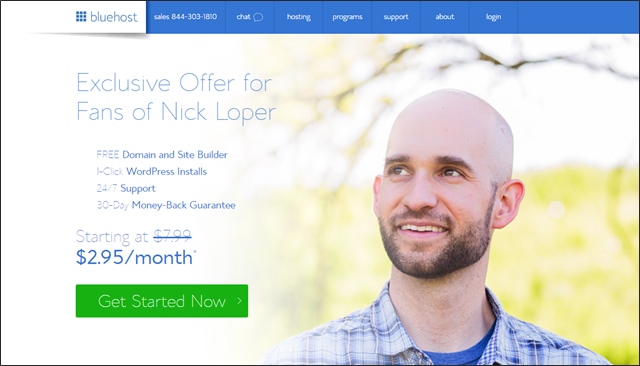
In fact, Bluehost actually put together a special deal for my readers, where you can get online for as little as $2.95 a month:
From there, it’ll ask you to pick a pricing plan:
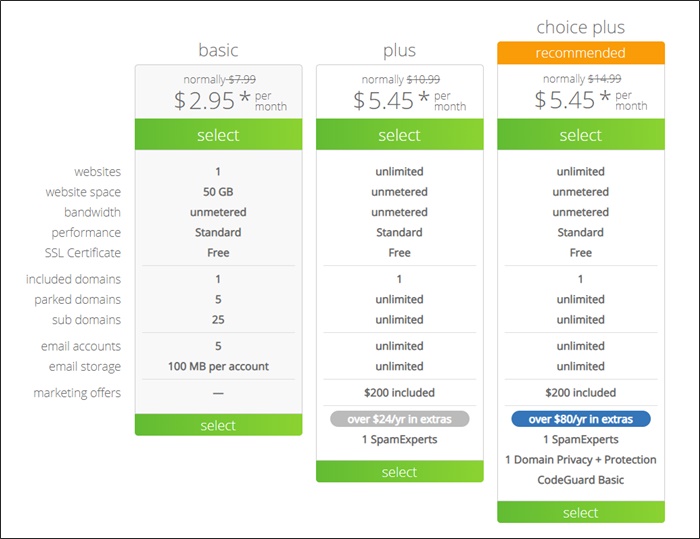
Think about what you actually need to get your site and business off the ground. If you can see yourself operating multiple sites down the road, maybe the Plus plan is appropriate.
For most new service business owners–who just need an online business card–the Basic plan is probably enough. You can always upgrade later should your needs change, but I like to start lean.
Next: Choosing Your Domain
This almost never happens, but the first domain I checked happened to be available, BusinessBookEditors.com.
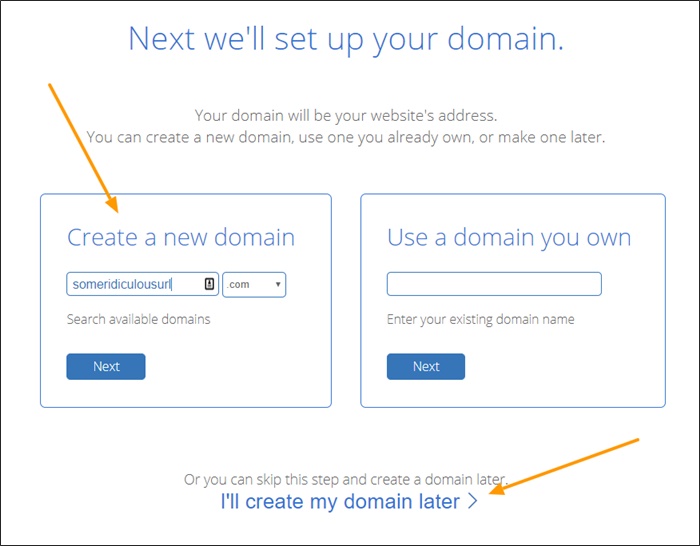
No, it’s not the most clever or catchy name in the world, but I wanted the domain to clearly explain the service offered — editing for business books — and niche it down even more from the general non-fiction work I’d been doing so far.
I also specifically wanted the “plural” version so the business could grow beyond just me at some point. And with the growth in self-publishing, I absolutely believe that it can.
Cost: $0. (For the first year, when purchased along with a hosting package.)
Note: This may be just a conspiracy theory, but I’d avoid looking for available domain names until you’re ready to pull the trigger and register one. I’ve heard from several people that the domains they saw available one day were gone the next after searching for them. Coincidence? Perhaps. Or perhaps some opportunistic spider-wielding domain squatter? I’m not sure, but my advice would be not to risk it.
If you’re not sure what domain would be best, you can always do that part later.
What if your perfect domain is taken? It happens!
In that case, you can use a tool like Domainr or Name Mesh to help brainstorm alternative domains, register a different extension (.net/.org/.us/.co, etc.), or even make an offer to the current domain owner – which is actually how I came to own SideHustleNation.com.
Step 2: Get Hosting
For smaller sites like this, I use Bluehost. They’re cheap and reliable, and when you’re starting out that’s pretty much all you need.
(As mentioned above, you can set-up your account for as little as $2.95 per month through this link.)
In this special offer for Side Hustle Nation, you’ll get:
- A free domain
- One click WordPress installation
- 24/7 live chat, phone, and email support
- A 30-day money back guarantee
- Safety in numbers. Bluehost powers 2 million websites worldwide, including several of my own sites.
- Pricing starting at $2.95 per month
- A free copy of The Progress Journal, my personal productivity tracking tool.*
*To claim, sign up through my affiliate link above. Then forward your Bluehost receipt to progress@sidehustlenation.com along with your preferred mailing address and I’ll get it in the mail to you right away.
Here’s a little walkthrough I filmed on selecting a domain name and getting your hosting setup. It’s for a different site than BusinessBookEditors.com, but you’ll see how my domain name is actually free in this video:
If you already have a hosting account for a blog or another website, you can generally add your new domain to your account for free.
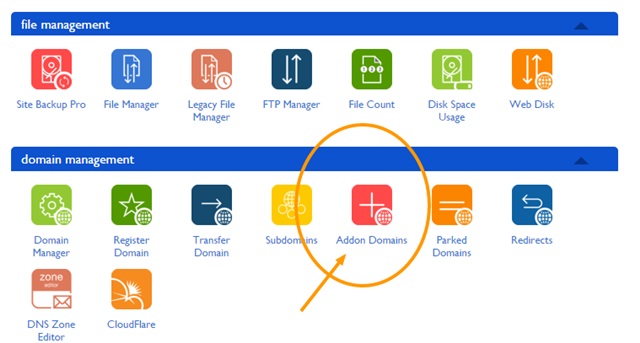
This process is really simple.
For example, if you registered your domain elsewhere, or already have a hosting account, you’ll just need to update your domain nameservers. In the case Bluehost, they’ll probably be NS1.BLUEHOST.COM and NS2.BLUEHOST.COM.
Cost: $0-5.95 per month.
Note: Pricing for shared hosting is cheaper the longer term you commit to. The $2.95 price above is for a 3-year deal all paid in advance, or $106.20.
The 1-year rate is $5.95 per month or $71.40 for the year.
Step 3: Pick a Theme
After you complete the sign-up process, you’ll be asked to select a theme for your website:
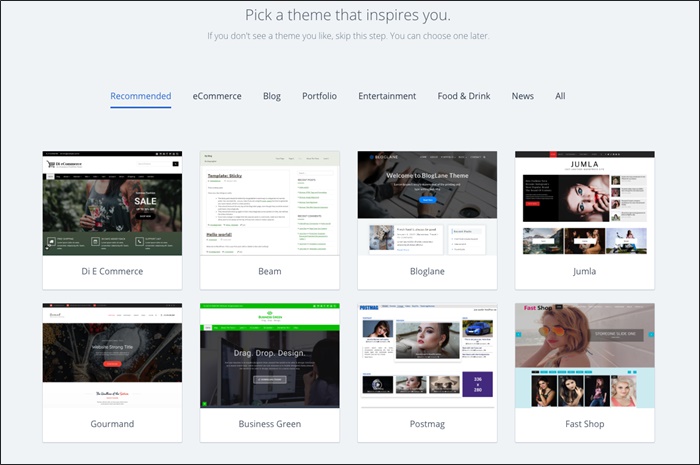
A theme is basically a pre-built template. There are some great-looking, super powerful themes available for free.
Later, you’ll customize the site with your content and images.
And the cool thing is, you can change themes any time if you find something you like better.
After you choose, you’ll see a screen like this:
WordPress is the powerful free content management system I use to power all my sites.
Didn’t See a Theme You Liked?
One of the awesome things about WordPress is the extensive library of free and premium themes. That means you can start your website with a beautiful-looking template with absolutely ZERO programming or design skills.
And because all themes are built on top of the WordPress platform, they’re all customizable after the fact. So if you find one you like but isn’t 100% perfect, you can probably tweak it to get it they you want (or find someone to help you do it).
In this case, I wanted a really simple one-page style site so I searched Google for “free one-page theme with pricing table.”
You can search whatever keywords are important to your site, or browse from within your WordPress admin panel.
Go to Appearance > Themes > Add New and browse or search away:

(If you find a theme through Google or another marketplace, you’ll use the zip installer shown.)
In the past I’ve used sites like FabThemes.com, which is where I found the previous theme for Side Hustle Nation. (Today I’m running GeneratePress.)
Searching for the perfect theme is something you can spend DAYS on, but I was determined to go “Lean Startup-style” and move quickly. The One Engine theme was one of the first ones I looked at and I thought it was really cool.
Cost: $0.
Step 4: Install the Theme
If you find a great theme through Bluehost, you’re already set.
If you’ve downloaded a theme from a third-party site, you’ll install the theme by uploading the .zip file through your WordPress admin panel.
(Shown in the screenshot above.)
After that you just have to hit “Activate” and you’re in business.
If you found a theme through the WordPress internal search, it’s even easier. You can install and activate directly from inside your website without worrying about where that .zip file ended up on your machine.
Through the Bluehost system, here’s what you might be greeted with after logging into WordPress:
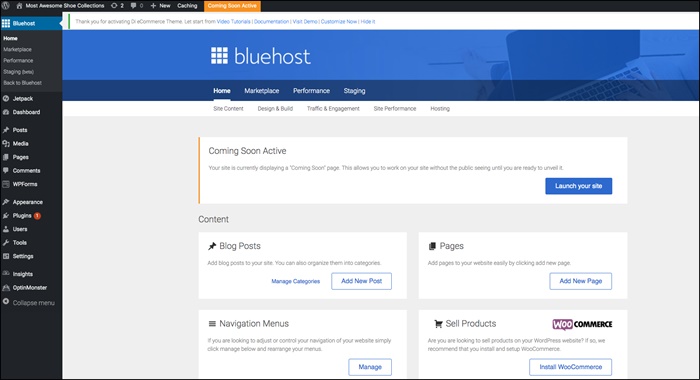
From there, you can begin designing and building out your site.
Step 5: Make It Your Own
Everything was flying up until this point, but then I hit a snag.
The theme was installed on the site, but the “out-of-the-box” version looked nothing like the demo!
I was like the excited kid on Christmas morning opening his new toy, only to see the dreaded “some assembly required” disclaimer.
After messing around with some of the settings and trying to figure out how the theme worked, and not making much progress, I had an idea.
I thought there must be a smarter way to rebuild this site to look like the demo version, so I turned to Fiverr.
From the top navigation menu, I chose Programming & Tech > WordPress.
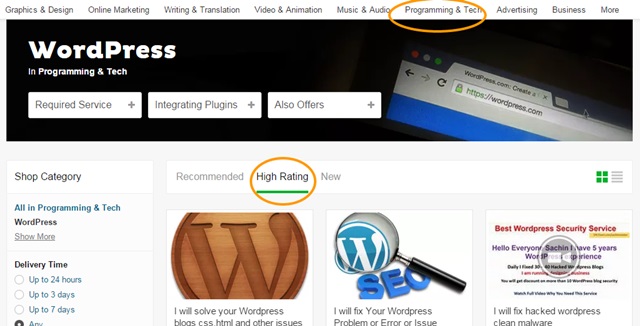
I sorted by highest rated, and a few rows down found EXACTLY what I was looking for:
“I will set up WordPress Theme Exactly as Demo”

(The gig description actually states it’s for Genesis themes, so I sent a note to see if they could work their magic on mine, and asking how much it would cost. I got an answer almost immediately and a quote of just $10. Don’t tell them, but I probably would have paid $50 without even questioning it!)
The work was performed super-fast, which led me to believe this might not actually be as complicated as I was making it out to be. Turns out, WordPress has an “import” function you can use, and many theme files will have an .xml file buried somewhere in that zip file or documentation.
(Tools > Import > WordPress)

Note: I did NOT test this personally, but if you’re just starting out you have almost nothing to lose if it doesn’t work.
That xml file is the key to this little hack. But for $10, it was an absolute steal (and now I have an idea of how to do it for next time).
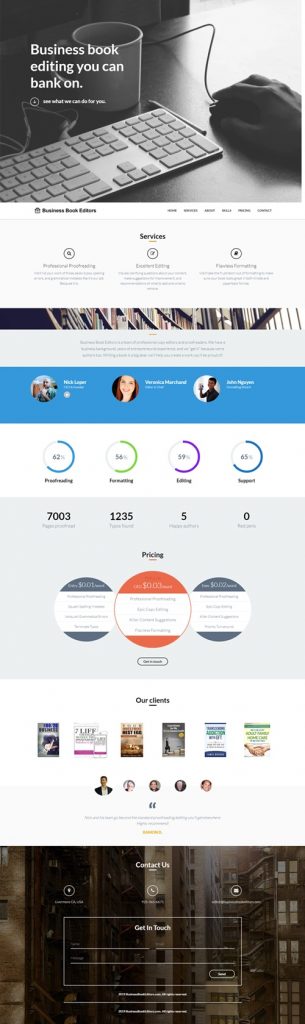
Instead of starting completely from scratch and attempting to re-build the site, I was able to start with the demo version and customize it to my needs. Maybe that’s a subtle distinction, but I’m convinced it saved me hours or maybe even days worth of work and frustration.
Then you can fill in the blanks and customize to your heart’s content.
Is it the world’s greatest website? Of course not.
But it’s good enough to serve as a decent-looking online business card.
And when you’re starting out, your website doesn’t need all the bells and whistles.
I’m actually pretty pumped about how it turned out. Warning: long scroll :)
Cost: $10.
Step 6: Set up the Email
The final step in this process – and this is optional – is setting up your domain email so people can contact you through the site.
The reason I say it’s optional is that you could just put your regular email down as the contact information, or set up a separate gmail account for the business, like businessbookeditors@gmail.com.
But I think that looks kind of tacky. It’s easy enough (and free) to set up an email account on your own domain and I think it looks way more professional.
Here’s how to get it done:
Cost: $0.
What’s Next?
And that’s how for less than $30 you can set up a great-looking site for your service biz if you already have hosting, and for less than $100 if you don’t.
So what’s next?
This post is meant to be a quick-and-dirty walkthrough on how you can quickly and cheaply set up an awesome-looking site for your side hustle service.
Until you have several clients under I belt I strongly believe you are far better off hustling for business than you are working on your website.
Let’s call this fast-and-cheap website building process the beginning of Phase 2 of your business.
You’ve:
- Defined your offering
- Validated the business, and
- Found your first few paying customers.
Now you’re ready to grow, and a professional web presence is an important component of that. Please feel free to steal this process!
Even feel free to re-package and sell it as a side hustle service, like Bryan talked about with his unique “tutorial hacking” technique!
Pin it for later:
I like what you have done here! I am trying to go guerrilla on the internet and get my side hustles going. Instead of book editing I went with resume’ writing and blogging.
I’m in the process of taking everything official by having a .com domain. Your information has been helpful!
Thanks,
Sam
Cool! Glad this was helpful Sam — thanks for stopping by.
Great case study, Nick. I definitely used to be on the other end of the spectrum when starting new ventures..
Now granted, these were ‘offline’ businesses, but I was sure to create business cards, a website, an 800 number, and usually some marketing materials before pounding the pavement.
There were more wins than losses, but at this point, though, my actions are a lot closer to those in your case study. It’s nice to have those first few sales for validation, and then invest some of that profit into the usual trimmings.
P.S. My wife & I both signed up and took our first Uber rides this weekend. Thanks for the promo code!
Thanks Patrick! Yep, all about finding those paying customers first, then reinvesting in that professional presence that can help find more or take the offering up-market a bit.
I like the fact you say you do not need a website. Far too many people, take far too long, building infrastructure they do not need, in an off-handed way to delay the work of doing the work…
Get out there and do it!! That is the best way to build alternate income streams.
Awesome post, thanks Nick! I’m really interested to learn more about your new book editing side hustle. Is this something you plan to document on your site? I have a graduate degree and have always been told I’m an excellent writer/editor, so I think that is something I could do too. I used to post on elance but never got any inquiries. I’d love to hear more!
You bet — if I’m able to scale and grow it, I’ll be sure to share the results here.
For getting gigs on Elance, these are the best resources I’ve seen on the topic:
http://under30ceo.com/hacking-elance-the-step-by-step-guide-to-how-i-made-23700-in-4-weeks/
http://thepowerofparttime.tv/episode36/
Cheers!
Thanks!
You know I’ll be one of your first clients!
I’m working on a book in which I don’t do any of the “work”, and only manage the process with VAs.
Awesome — keep me posted Alex!